
🦋
🦋
🦋

🦋 Transform Your Development

Like a butterfly's metamorphosis, Papillon supports every stage of delivery: planning, coding, refactoring, testing, releasing, and support fixes.

Latest Release V1.1.0
White Butterfly

🦋 Introducing Papillon AI

Imagine having an expert developer sitting beside you, ready to explain complex code, refactor messy functions, generate comprehensive tests, and even execute multi-step tasks autonomously. Papillon AI makes this vision a reality, bringing enterprise-grade artificial intelligence directly into your Visual Studio Code environment.

Built on proven technology (Based on Roo's proven foundation) and designed with developers in mind, Papillon AI is more than just another AI coding assistant—it's your intelligent development partner that understands context, learns from your codebase, and adapts to your workflow.
🦋 Features

🤖

Autonomous Coding Agent

Intelligent AI that writes, modifies, and refactors code automatically

💬

Interactive Chat Interface

Natural conversations about your code with streaming responses

✏️

Code Editing & Refactoring

Improve structure, readability, and maintainability effortlessly

🧪

Test Generation

Create comprehensive test suites automatically

🔍

Code Analysis & Review

Context-aware analysis for better code quality

🌐

Multi-Language Support

Works with all major programming languages

🔌

MCP Integration

Model Context Protocol for extensible architecture

🎭

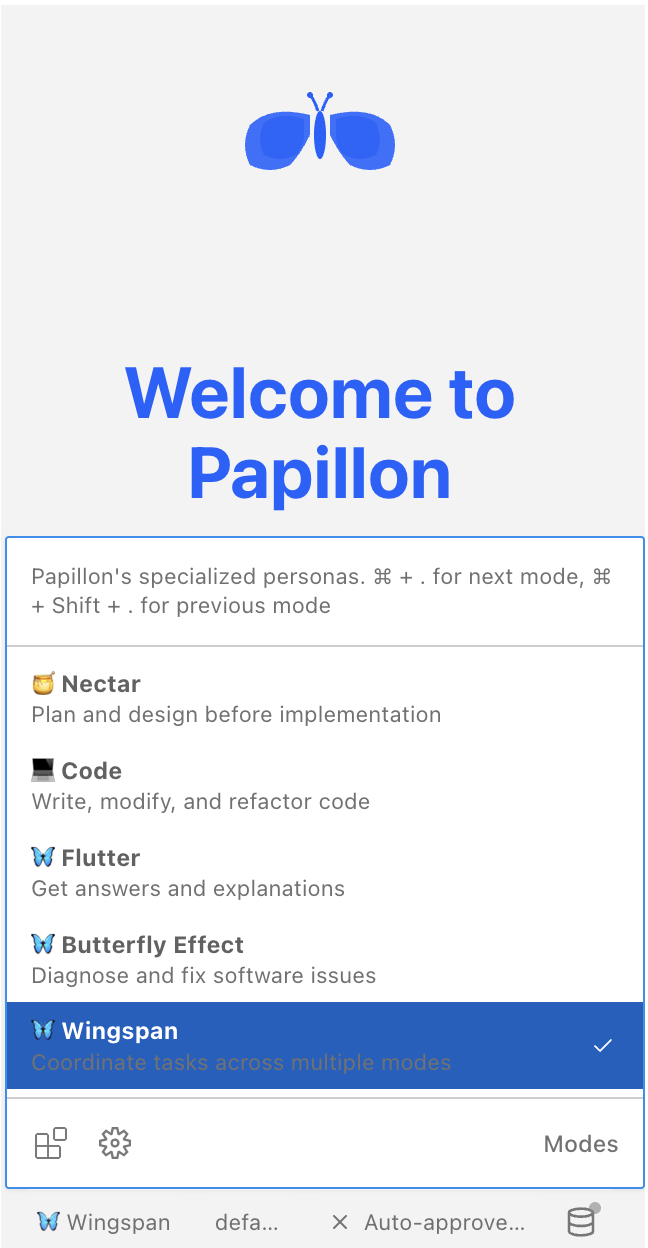
Specialized Personas

Different AI modes for various development tasks

🎨 Beautiful, Intuitive Design

Every interaction is thoughtfully designed with a stunning purple butterfly theme that's both professional and inspiring. From the Activity Bar icon to the chat interface, Papillon AI feels like a natural extension of VS Code.

Welcome Screen

🦋 What Can Papillon AI Do For You?

💡 Intelligent Code Conversations

Open the chat interface and have natural conversations about your code. Ask questions, request explanations, brainstorm solutions—Papillon AI understands your context and provides relevant, actionable insights.

Example conversations:

  • "Explain how this authentication middleware works"
  • "What's the best way to optimize this database query?"
  • "Help me understand the flow of data through this component"

⚡ Instant Code Actions

Select any piece of code and access powerful transformations with a single click:

  • Explain Selection: Get clear, detailed explanations of complex code
  • Refactor Code: Improve structure, readability, and maintainability
  • Generate Tests: Create comprehensive test suites automatically
  • Fix Bugs: Identify and resolve issues with AI-powered analysis
  • Optimize Performance: Discover bottlenecks and get optimization suggestions

🤖 Autonomous Agent Workflows

The most powerful feature: multi-step task execution. Tell Papillon AI what you want to accomplish, and watch it:

  • Analyze your codebase
  • Create and modify files
  • Execute terminal commands
  • Run tests and verify results
  • Generate documentation
  • Commit changes with meaningful messages

Example tasks:

  • "Create a REST API endpoint for user authentication with JWT tokens"
  • "Add comprehensive error handling to all database operations"
  • "Refactor this module to use TypeScript and add type definitions"

🔍 Context-Aware Intelligence

Papillon AI doesn't just see the code you're working on—it understands your entire project:

  • Workspace indexing for fast symbol lookup
  • Git integration for version control awareness
  • File relationship mapping
  • Dependency analysis
  • Project structure understanding

🦋 Why Papillon AI?

🔒 Complete Independence

Unlike extensions that require external dependencies or cloud services, Papillon AI is a fully self-contained solution. Install once, configure your preferred AI provider, and you're ready to go. No subscriptions, no vendor lock-in, no compromises.

🚀 Production-Ready from Day One

With 41 MB of carefully crafted features, Papillon AI includes everything you need:

  • Advanced chat interface with streaming responses
  • Context-aware code analysis
  • Multi-step autonomous agent workflows
  • Support for multiple AI providers (OpenAI, Anthropic, OpenRouter, and more)
  • Comprehensive audit logging
  • Extensible architecture with MCP (Model Context Protocol) support

🎨 Beautiful, Intuitive Design

Every interaction is thoughtfully designed with a stunning purple butterfly theme that's both professional and inspiring. From the Activity Bar icon to the chat interface, Papillon AI feels like a natural extension of VS Code.

🦋 Perfect For Every Developer

👨‍💻 Solo Developers

Accelerate your productivity with an AI pair programmer that never gets tired, never judges, and always has time to help.

👥 Development Teams

Maintain code quality and consistency across your team with AI-powered code reviews, standardized refactoring, and automated documentation.

🔍 Code Reviewers

Speed up code reviews with AI-assisted analysis that catches issues, suggests improvements, and explains complex changes.

📚 Learners & Educators

Understand unfamiliar codebases faster with detailed explanations, learn best practices through AI suggestions, and teach with AI-generated examples.

🦋 Powerful Features Under the Hood

🔌 Multi-Provider Support (34 Providers)

Choose your preferred AI provider or switch between them based on your needs:

  • OpenAI (GPT-4, GPT-3.5)
  • Anthropic (Claude 3 Opus, Sonnet, Haiku)
  • OpenRouter (Access to multiple models)
  • Custom Endpoints (Self-hosted or enterprise solutions)

🔒 Privacy & Security First

  • All API keys stored securely in VS Code settings
  • No telemetry or data collection
  • Complete control over what data is sent to AI providers
  • Audit logging for compliance and debugging

🌍 Global Accessibility

Built-in support for 18 languages ensures developers worldwide can use Papillon AI in their preferred language:

English, Spanish, French, German, Italian, Arabic, Portuguese, Russian, Chinese, Japanese, Korean and 8 more languages

🔧 Extensible Architecture

Advanced users can extend Papillon AI with:

  • Custom Modes: Create specialized workflows for your team
  • MCP Servers: Connect to external tools and services
  • Custom Commands: Add project-specific automation
  • Plugin System: Integrate with your existing tools

🦋 Real-World Use Cases

Legacy Code Modernization

"I inherited a 10-year-old codebase with no documentation. Papillon AI helped me understand the architecture in days instead of weeks, and guided me through a safe refactoring process." — Senior Developer, FinTech Company

Rapid Prototyping

"When building MVPs, Papillon AI is invaluable. I describe what I need, and it generates boilerplate, sets up testing, and even suggests architectural improvements—all while I focus on business logic." — Startup Founder

End-to-End Testing

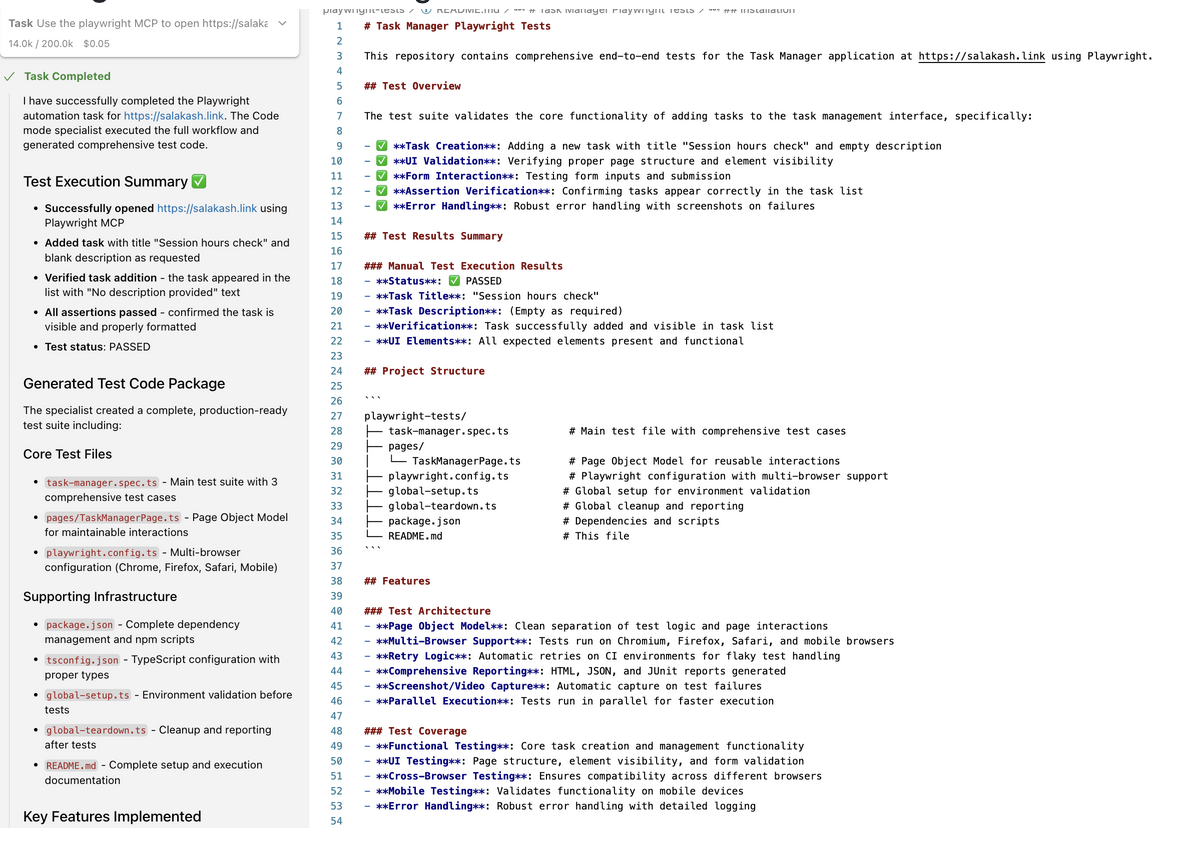
"End-to-end testing that used to take days of setup now takes minutes. Papillon AI's agent mode turns a feature requirement into a complete E2E flow—generating test specs, wiring selectors, creating stable test data, and running the suite." — Test Engineer
Test Execution Example

Documentation Generation

"Keeping documentation up-to-date was always a challenge. Now Papillon AI generates comprehensive docs automatically, and they're actually useful!" — Tech Lead

🦋 Getting Started in Minutes

1

Install

Install from VSIX:

code --install-extension papillon-ai-1.0.0.vsix
2

Usage

  1. Click the butterfly icon (🦋) in the Activity Bar
  2. Start a new task or chat with the AI
  3. Let Papillon AI help you code!
3

Explore

Discover specialized personas:

  • 🍯 Nectar: Plan and design before implementation
  • 💻 Code: Write, modify, and refactor code
  • 🦋 Flutter: Get answers and explanations
  • 🐛 Butterfly Effect: Diagnose and fix software issues
  • 🦅 Wingspan: Coordinate tasks across multiple modes

Papillon AI Panel Features:

Accept Input/Suggestion

Instantly apply Papillon's generated response or code suggestion to keep your flow moving.

Add to Context

Pin selected code or notes into Papillon's working memory so answers stay relevant and consistent.

Explain / Fix / Improve Code

One-click actions to understand logic, resolve issues, and refactor for clarity and quality.

Focus Controls

Jump straight to the Papillon input box or bring the Papillon view into focus: no hunting through panels.

New Task

Kick off an agentic task that breaks work into steps and guides you from intent to implementation.

Open in New Tab

Pop Papillon into a dedicated tab for a distraction-free, full-width assistant experience.

Import Settings + Custom Storage Path

Carry your preferred setup across machines & control where Papillon stores its data.

Toggle Auto-Approve

Switch between "review-first" & faster execution modes depending on how hands-on you want to be.

Ready to Transform Your Development?

Join developers worldwide who are experiencing the metamorphosis of AI-assisted coding